Laptop accessories
MacBook Privacy Screens: How to Check Fit Before Buying
By Modexa
Check your exact MacBook model, attachment method and viewing needs before choosing a privacy filter. Learn what to verify in the product listing.
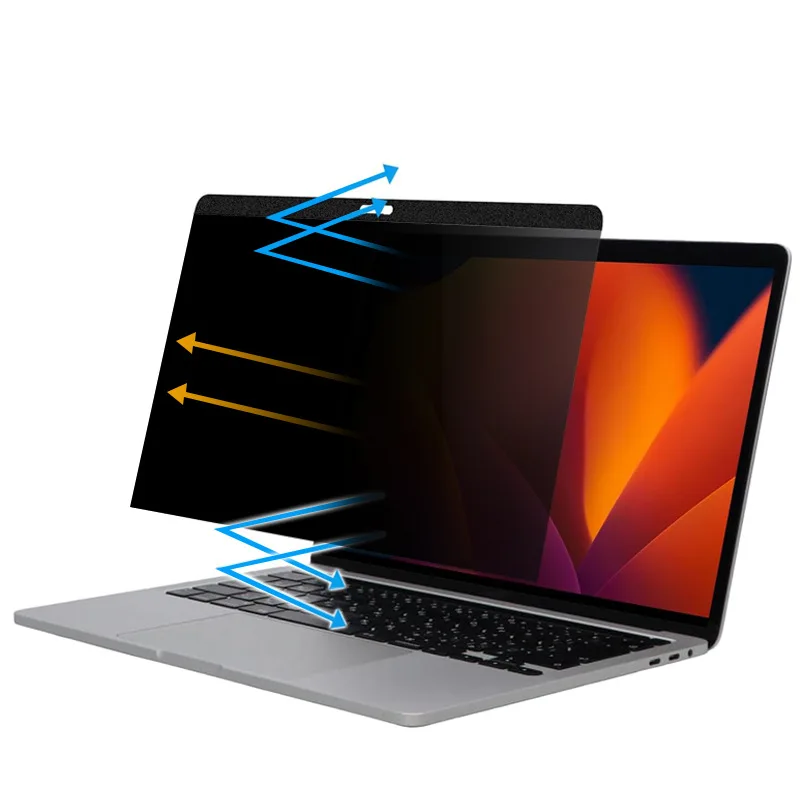
Product example from the Modexa collection. Match the filter to the exact laptop model and follow its fitting instructions.
Think about where you use your laptop
A privacy filter can be useful when you work near other people, but begin with your actual setting. Consider which side of the screen is exposed in a shared office, on a train or at a customer counter. A filter is one part of keeping work private. Your seating position, screen-lock habits and the information you display also matter, especially when someone can stand directly behind you.
Match the exact MacBook model
Check the laptop's model information and compare it with the compatibility details for the selected filter. A screen-size label alone does not confirm the dimensions, camera area or attachment arrangement. The Modexa listing is described for 2024 MacBook Pro models; confirm the exact supported model and selected size rather than assuming that all MacBooks with a similar name share the same fit.
Read how the viewing restriction works
Check the manufacturer's explanation of viewing angles and orientation. Do not interpret a privacy claim as making the screen unreadable from every direction. Think about where another person is likely to sit or stand and whether you regularly rotate or share the display. If the listing does not explain the intended viewing arrangement, ask for that information before deciding.
Compare attachment and removal
Look at whether the filter uses magnets, tabs, adhesive or another attachment method. Check the fitting instructions and how it is removed for cleaning or sharing the display. Confirm that the camera and any relevant sensors remain unobstructed. Follow the laptop and accessory manufacturers' instructions about closing the lid; do not assume an attachment can remain in place simply because it is marketed as slim.
Consider visibility during your normal work
Privacy filtering and surface finishes can change the viewing experience. Check what the listing says about the finish, display clarity and any stated brightness trade-off, without assuming every filter behaves alike. Consider your main tasks, such as reading text, editing photos or presenting to a colleague. If precise colour work matters, confirm suitability and purchase terms before choosing an accessory from photos alone.
Review care and purchase details
Follow the cleaning instructions for both the laptop display and filter, including guidance on removal and permitted materials. Avoid assuming that a washable accessory means the laptop screen should be cleaned in the same way. Modexa's magnetic privacy-screen listing is a starting point for checking compatibility and available options. Confirm the model match, included items, current price, shipping and return policy before checkout.
View the magnetic MacBook privacy screen
Questions before ordering? Contact Modexa. Review our shipping policy and return policy.